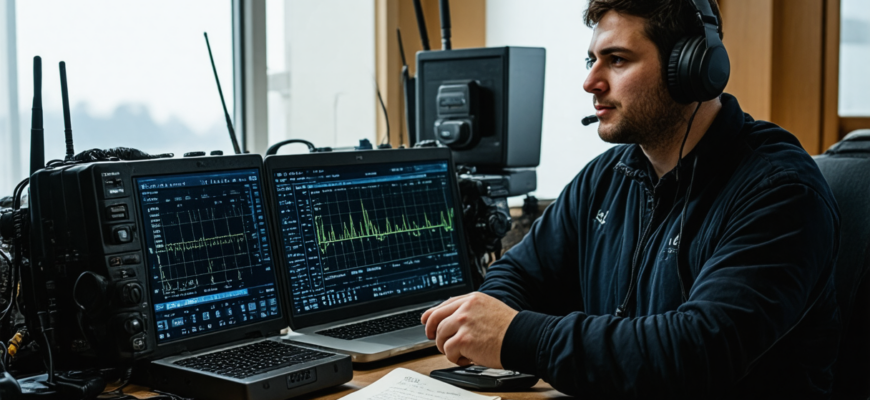
Digital modes have revolutionized amateur radio, opening up new possibilities for communication over long distances, coping with challenging conditions, and engaging with a global community. Among these modes, FT8 and PSK31 stand out as two of the most popular and widely used. Whether you are a beginner or an experienced hobbyist looking to expand your repertoire, understanding these digital modes is essential. This comprehensive guide aims to introduce you to the fundamentals of FT8 and PSK31, walk you through setup and operation, and provide useful tips to maximize your experience in the world of digital amateur radio.
- Introduction to Digital Modes in Amateur Radio
- What are Digital Modes?
- Why Use Digital Modes?
- Popular Digital Modes: FT8 and PSK31
- FT8: The Workhorse of Digital HF Communication
- PSK31: The Classic Morse of Digital Modes
- Getting Started with FT8
- Equipment Needed
- Basic Setup Procedure
- Operating Tips for FT8
- Getting Started with PSK31
- Equipment Needed
- Basic Setup Procedure
- Best Practices for PSK31 Operation
- Comparing FT8 and PSK31
- Propagation and Use Cases
- Pros and Cons Summary
- Advanced Topics and Tips
- Improving Digital Mode Performance
- Legal and Best Operating Practices
- Embracing Digital Modes in Amateur Radio
- Summary Table: Key Points to Remember
- Further Resources
Introduction to Digital Modes in Amateur Radio
What are Digital Modes?
Digital modes refer to a range of techniques that utilize computer technology to encode and decode radio signals. They allow amateur radio operators to send text, images, or even other data over radio frequencies using software that modulates signals into digital formats. Unlike traditional voice or Morse code, digital modes are highly efficient, resilient to interference, and customizable.
Why Use Digital Modes?
- Enhanced Communication Range: Digital modes can effectively carry signals over thousands of kilometers even under poor propagation conditions.
- Efficient Spectrum Usage: They utilize narrow bandwidths, allowing multiple users to operate simultaneously without interference.
- Ease of Use: Automated decoding and high automation levels reduce the need for advanced Morse code skills.
- Global Community: Digital modes facilitate worldwide connectivity, contests, and data sharing.
Popular Digital Modes: FT8 and PSK31
FT8: The Workhorse of Digital HF Communication
Developed by Joe Taylor, K1JT, FT8 (Format 8) has become a standard in HF digital communication. Its name derives from its 8-tone, multiple-symbol structure. FT8 is optimized for quick, reliable decoding of weak signals, making it ideal for contesting, DXing, and routine skeds.
PSK31: The Classic Morse of Digital Modes
PSK31, short for Phase Shift Keying, 31.5 baud, is a mode that specializes in keyboard-to-keyboard communication. It offers real-time, conversational style interactions over HF, providing a low bandwidth but highly effective method of digital communication. PSK31 remains popular among amateurs for casual QSOs and learning digital operating techniques.
Getting Started with FT8
Equipment Needed
| Component | Description |
|---|---|
| Transceiver | HF transceiver capable of SSB and digital operation |
| Computer | PC or laptop with Windows, macOS, or Linux |
| Audio Interface | Sound card interface or USB sound adapter for audio signal transfer |
| Cables | Radio-to-computer audio cable, power supply, antenna connections |
| Software | FT8 decoding and encoding programs (e.g., WSJT-X) |
Basic Setup Procedure
- Hardware Connection: Connect your transceiver to your computer’s sound card input/output via an appropriate interface or USB sound card.
- Configure Radio Settings: Set your transceiver to operate in SSB mode, with appropriate output power (typically 10-100W) and antenna tuned to your desired band.
- Install and Configure Software: Download WSJT-X or similar software. Configure the sound card, select your operating band, and set your call sign and grid locator.
- Test Connection: Ensure audio levels are proper, and establish initial contact with a known station or run a test transmission.
Operating Tips for FT8
- Timing: FT8 uses precise timing in 15-second intervals; synchronize your computer clock regularly using NTP servers or internet time.
- Calling CQ: Use the “CQ” function in the software to announce your presence on the band.
- Responding: Monitor the decode window for incoming signals, and respond promptly to calls.
- Logging: Keep logs of all contacts for contest entries and station achievement records.
Getting Started with PSK31
Equipment Needed
| Component | Description |
|---|---|
| Transceiver | HF transceiver capable of SSB operation |
| Computer | PC or laptop with Windows, macOS, or Linux |
| Audio Interface | Sound card or USB sound adapter for audio management |
| Cables | Radio-to-computer audio cables, antenna connections |
| Software | Programs like Fldigi, MixW, or Digipan that support PSK31 encoding/decoding |
Basic Setup Procedure
- Hardware Connection: Connect your transceiver’s audio output and input to your computer via a suitable interface.
- Configure Software: Install your chosen PSK31 software, and set the sound card as the input/output device.
- Set Operating Parameters: Select the PSK31 mode, set the frequency carefully (commonly around 14.070 MHz for 20m band), and configure TX/RX parameters.
- Test Operation: Send a test message to verify correct audio levels and decodes.
Best Practices for PSK31 Operation
- Keyboard Etiquette: Use a clear call sign and short messages for efficiency.
- Frequency Management: Keep the frequency stable; avoid rapid tuning changes to maintain modulation lock.
- Engagement: Join digital nets or simply initiate QSOs with other operators.
- Logging and Reporting: Record contacts for awards and personal achievement tracking.
Comparing FT8 and PSK31
Propagation and Use Cases
| Aspect | FT8 | PSK31 |
|---|---|---|
| Best for | Weak signal contacts, contesting, DXing | Casual QSOs, keyboard-to-keyboard conversations |
| Bandwidth | Very narrow (around 50 Hz) | Moderate (around 100 Hz) |
| Communication Style | Automated, mostly one-way exchanges with minimal operator input | Interactive, real-time keyboard chat |
| Operational Complexity | Relatively simple, requires precise timing | Moderate, with ongoing manual operation |
Pros and Cons Summary
- FT8 Pros: High sensitivity, suitable for weak signals, fast setup, popular in contests.
- FT8 Cons: Limited conversational ability, relies on precise timing.
- PSK31 Pros: Dynamic and conversational, good for local and casual contacts, easy to learn.
- PSK31 Cons: Less effective under extremely weak signals, more operator involvement needed.
Advanced Topics and Tips
Improving Digital Mode Performance
- Use High-Quality Antennas: Proper, well-tuned antennas can significantly enhance signal quality and decode rates.
- Optimize Your Audio Levels: Proper gain settings prevent distortion and improve decoding accuracy.
- Time Synchronization: Keep your computer clock accurate to prevent decoding errors, especially critical in FT8.
- Experiment with Settings: Adjust parameters like bandwidth, move to different frequencies, and try various software settings for optimal results.
Legal and Best Operating Practices
- Always operate on permitted amateur radio frequencies and follow local regulations.
- Obtain necessary licenses and permissions before engaging in digital modes.
- Respect other operators’ transmissions and adhere to net protocols.
- Maintain good station discipline, including avoiding frequencies during emergency or priority traffic.
Embracing Digital Modes in Amateur Radio
Getting started with digital modes like FT8 and PSK31 opens a new dimension in amateur radio communication. These modes expand the possibilities for contact, experimentation, and community engagement. With proper setup, respect for operating practices, and ongoing learning, operators can enjoy significant success and satisfaction. The future of digital modes promises continued innovation, making amateur radio more accessible and versatile than ever before. Dive into the digital realm, explore new techniques, and connect with fellow enthusiasts across the globe.
Summary Table: Key Points to Remember
| Aspect | FT8 | PSK31 |
|---|---|---|
| Ideal For | Weak signals, contesting | Casual QSOs, keyboard chat |
| Setup Complexity | Simpler, requires precise timing | Moderate, more manual operation |
| Operation Style | Automated, minimal input | Interactive, real-time typing |
| Propagation Effectiveness | Excellent for challenging conditions | Good for everyday conditions |
Further Resources
Embarking on digital modes enhances both the technical skills and the enjoyment of amateur radio. Whether you aim for technical excellence, worldwide contacts, or just a new hobby twist, FT8 and PSK31 offer exciting opportunities for all enthusiasts.
Похожие записи:
 Revolutionizing Communications: The Latest Software Updates Enhancing Digital Modes in Amateur Radio
  Top Accessories to Maximize Your Performance in Digital Mode Amateur Radio Operations
  Portable Spectrum Analyzers for Field Frequency Testing: A Complete Guide for Amateur Radio Enthusiasts
  Essential Tools for Cable and Connection Maintenance: A Complete Guide for Amateur Radio Enthusiasts
  Mastering Digital Voice Conferences: How to Participate Effectively in the Modern Amateur Radio Era
  Understanding Ham Radio Frequencies and Bands: A Comprehensive Guide for Amateur Radio Enthusiasts
  How to Build Your Own Homemade QRP Transceiver: A Comprehensive Guide for Amateur Radio Enthusiasts
  Top Microphone and Speaker Combos for Clear Audio: The Ultimate Guide for Amateur Radio Enthusiasts
  Integrating Software-Defined Radio into Your Daily Operations: A Comprehensive Guide for Amateur Radio Enthusiasts
  Basic Antenna Types and Their Uses for Beginners: A Comprehensive Guide for Amateur Radio Enthusiasts
  How to Build a Simple Dipole Antenna at Home: A Comprehensive Guide for Amateur Radio Enthusiasts
  Comprehensive Review of the Latest Mobile Radio Apps and Software for Amateur Enthusiasts
  Top Weather-Resistant Microphones for Outdoor Use: The Ultimate Guide for Amateur Radio Enthusiasts
  How to Choose Your First Amateur Radio Transceiver: Essential Tips for Beginners
  Mastering Your Amateur Radio Antenna: Comprehensive Guide to Tuning and Testing
  Comprehensive Review of the Latest Transceiver Models on the Market: Innovations and Performance for Amateur Radio Enthusiasts