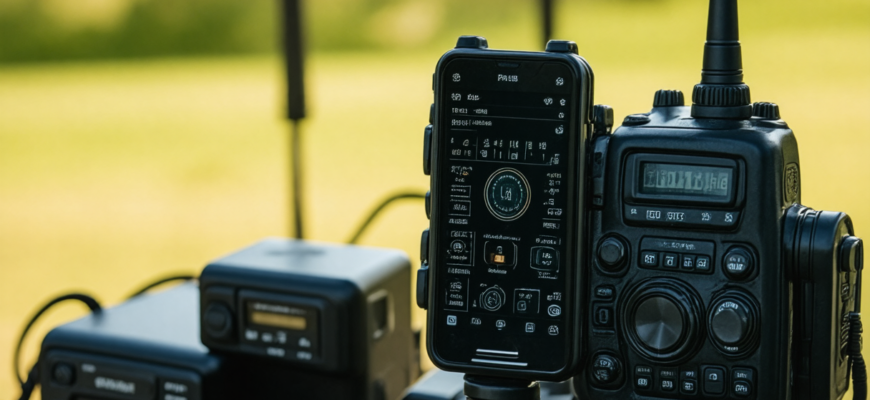
In the modern era of technology, amateur radio operators are increasingly seeking innovative ways to enhance their station’s functionality. One of the most versatile and accessible tools available today is the smartphone. Equipped with powerful hardware and a vast array of applications, smartphones can be transformed into effective radio control and logging devices. This comprehensive guide explores how to leverage your smartphone for radio operations, combining convenience, precision, and efficiency.
- Introduction to Smartphone Integration in Amateur Radio
- Essential Hardware Components for Smartphone-Based Radio Control
- 1. Compatible Smartphone
- 2. Radio Interface Hardware
- 3. Cables and Adapters
- Choosing the Right Software Applications
- 1. Radio Control Apps
- 2. Logging and Digital Mode Apps
- 3. Digital Mode Software
- Setting Up Your Smartphone as a Radio Control Device
- 1. Hardware Connection Setup
- 2. Configuring the Software
- Using Your Smartphone for Radio Logging
- 1. Real-Time Logging Procedures
- 2. Automating Logging with Digital Modes
- Advanced Tips for Optimized Smartphone Usage
- 1. Enhancing Connectivity Reliability
- 2. Power Management
- 3. Customization and Automation
- Safety and Best Practices
- 1. Ensuring Interference-Free Operation
- 2. Maintaining Data Security
- Future Trends in Smartphone-Based Radio Control and Logging
- Additional Resources
- References and Further Reading
Introduction to Smartphone Integration in Amateur Radio
Traditional amateur radio setups often involve dedicated hardware for control, logging, and communication. However, advances in software development and mobile technology have paved the way for integrating smartphones into these roles. Using your smartphone as a control and logging device offers several advantages:
- Portability and compactness
- Ease of use with familiar interfaces
- Access to extensive apps and features
- Cost-effectiveness compared to dedicated equipment
In this guide, we’ll discuss the essential components, applications, setup procedures, and best practices for transforming your smartphone into a reliable radio control and logging device.
Essential Hardware Components for Smartphone-Based Radio Control
1. Compatible Smartphone
Most modern smartphones, whether Android or iOS-based, are capable of supporting the necessary applications. Ideally, select a device with:
- High processing power
- Good Bluetooth, Wi-Fi, or USB connectivity options
- Long battery life
- Reliable build quality for rugged environments
2. Radio Interface Hardware
To connect your smartphone with the amateur radio transceiver, you need an interface device. Common options include:
- Audio Interfaces: For controlling the radio via audio signals (using PTT and frequency control)
- CAT (Computer Aided Transceiver) Interfaces: Standard digital protocols to remotely control transceivers (e.g., via USB or Bluetooth)
- Bluetooth Smart Modules: Compact modules for wireless control and logging
Popular interface devices include the Elecraft KX3’s KXFList or stand-alone interface units like the MicroHam or RigExpert.
3. Cables and Adapters
Depending on your interface hardware, ensure you have the appropriate USB, audio, or Bluetooth adapters for seamless connectivity.
Choosing the Right Software Applications
1. Radio Control Apps
Many applications allow remote control of amateur radios via smartphones. The selection depends on your transceiver model and connectivity options:
- CubeCell — For general remote control leveraging CAT protocols
- Ham Radio Controller — Compatible with various radios and offers customizable layouts
- GeoLite — For geolocation-based operations
2. Logging and Digital Mode Apps
Logging your contacts efficiently is vital for contesting and maintaining records. Popular logging apps include:
- HamLog — Cross-platform logging with DX-cluster, mapping, and contest features
- LOG4OM — Advanced logging with award tracking, built-in mapping, and supports digital modes
- Logger32 — Comprehensive logging with multi-user support
3. Digital Mode Software
Enabling digital modes such as FT8, JT65, PSK31, or RTTY on your smartphone involves specialized apps like:
- WSJT-X — For FT8, FT4, JT65, and other modes (via USB interface or specialized hardware)
- FLrig — Digital radio control with multiple protocols
- DROIDRTTY — For RTTY digital modes on Android
Setting Up Your Smartphone as a Radio Control Device
1. Hardware Connection Setup
The first step involves establishing a reliable connection between your radio transceiver and smartphone. Typical setup steps include:
- Selecting an appropriate interface hardware compatible with your radio model.
- Connecting the interface to your radio’s control port (e.g., CAT, serial, or audio jack).
- Connecting your smartphone via USB, Bluetooth, or Wi-Fi, depending on the interface hardware.
2. Configuring the Software
After establishing the hardware connection, proceed with software setup:
- Install the chosen control app on your smartphone.
- Configure the app parameters, such as radio model, connection type, baud rate, and COM port.
- Test control functions like frequency change, PTT, band switching, and mode selection.
Using Your Smartphone for Radio Logging
1. Real-Time Logging Procedures
Logging contacts can be streamlined with dedicated apps that support real-time entry:
- Input contact details manually or via Bluetooth barcode scanners.
- Use pre-filled lookup tables for DXCC, IOTA, or awards.
- Sync data with cloud services or export in ADIF format for backup or further analysis.
2. Automating Logging with Digital Modes
Digital mode software often automates contact logging by decoding signals and populating logs automatically. To maximize efficiency:
- Set up your digital mode app before starting operations.
- Ensure audio input/output is correctly configured to allow decoding.
- Use filters and thresholds within the app to optimize decoding accuracy.
Advanced Tips for Optimized Smartphone Usage
1. Enhancing Connectivity Reliability
- Use shielded cables and proper grounding to reduce interference.
- Employ high-quality Bluetooth modules to minimize connection drops.
- Consider using Wi-Fi repeaters to extend wireless connectivity in large setups.
2. Power Management
Long operating sessions demand efficient power usage:
- Utilize portable batteries or power banks compatible with your smartphone.
- Adjust screen brightness and disable unnecessary background apps.
- Enable power-saving modes when operating in field conditions.
3. Customization and Automation
Leverage automation tools and custom scripts to streamline workflows:
- Create shortcut gestures for frequently used functions.
- Integrate with external devices such as GPS modules for location tagging.
- Use automation apps like Tasker (Android) to trigger specific actions based on conditions.
Safety and Best Practices
1. Ensuring Interference-Free Operation
When connecting electronic devices, always follow best practices to minimize electromagnetic interference:
- Use shielded cables and proper grounding techniques.
- Avoid placing equipment near sensitive circuits.
- Test connections thoroughly before transmission.
2. Maintaining Data Security
Keep logs and contact data secure by:
- Using encrypted storage options.
- Backing up data regularly to cloud or external devices.
- Using secure Wi-Fi networks for synchronization and data transfer.
Future Trends in Smartphone-Based Radio Control and Logging
The integration of smartphones into amateur radio continues to evolve. Emerging trends include:
- Increased use of Software Defined Radio (SDR) platforms that interface directly with smartphones.
- Development of dedicated hardware modules supporting bbluetooth Low Energy (BLE) for seamless control.
- Enhanced application ecosystems offering unified control, logging, and digital modes in a single platform.
- Integration with AI and machine learning algorithms for signal decoding and log analysis.
Transforming your smartphone into a radio control and logging device offers amateur radio operators a powerful, portable, and user-friendly solution. Through choosing the right hardware, applications, and setup procedures, operators can significantly enhance their station’s capabilities. Whether participating in contests, field operations, or routine QSOs, leveraging smartphone technology provides increased flexibility and operational efficiency.
As technology advances, embracing these innovations will continue to redefine the amateur radio experience, making it more accessible and enjoyable for enthusiasts worldwide.
Additional Resources
| Resource | Description | Link |
|---|---|---|
| Ham Radio Outlet | Supplier of radio hardware and accessories | https://www.hamradio.com |
| QRZ.com | Comprehensive database for callsigns and licensing | https://qrz.com |
| Amateur Radio Software | Community and software downloads | https://www.eham.net |
References and Further Reading
- Ham Radio for Dummies by H. Ward Silver
- The ARRL Handbook for Radio Communications
- Online forums and communities such as Reddit r/amateurradio
- Official manuals for specific transceivers and interface devices
Harnessing your smartphone can transform your amateur radio station into a more flexible, efficient, and enjoyable setup. Embrace the digital revolution and elevate your radio experience today!
Похожие записи:
 Comprehensive Review of the Latest Mobile Radio Apps and Software for Amateur Enthusiasts
  Understanding Ham Radio Frequencies and Bands: A Comprehensive Guide for Amateur Radio Enthusiasts
  Portable Spectrum Analyzers for Field Frequency Testing: A Complete Guide for Amateur Radio Enthusiasts
  Integrating Software-Defined Radio into Your Daily Operations: A Comprehensive Guide for Amateur Radio Enthusiasts
  How to Build a Simple Dipole Antenna at Home: A Comprehensive Guide for Amateur Radio Enthusiasts
  Getting Started with Digital Modes like FT8 and PSK31: A Complete Guide for Amateur Radio Enthusiasts
  Basic Antenna Types and Their Uses for Beginners: A Comprehensive Guide for Amateur Radio Enthusiasts
  Portable Antenna Analyzers for Precise Tuning: The Ultimate Guide for Amateur Radio Enthusiasts
  How to Use Repeater Networks for Better Coverage: A Complete Guide for Amateur Radio Enthusiasts
  Comprehensive Review of the Latest Transceiver Models on the Market: Innovations and Performance for Amateur Radio Enthusiasts
  Building a Simple, Low-Cost Antenna Tuner at Home: A Comprehensive Guide for Amateur Radio Enthusiasts
  Mastering Multiple Frequency Programming: The Ultimate Guide for Amateur Radio Enthusiasts
  Integrating Internet-Linked Repeater Systems with Traditional Ham Gear: A Comprehensive Guide
  Using Software to Enhance Your Amateur Radio Experience: Unlocking New Possibilities
  Mastering Regulatory Changes: A Comprehensive Guide for Amateur Radio Enthusiasts
  Top Choices for Budget-Friendly Amateur Radio Equipment: A Comprehensive Guide for Hobbyists